1. Open Corel DRAW. Type the text with any type
of font.

2. Draw rectangle with rectangle tool on the top half of the text.
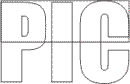
3. Select both objects (text and Rectangle) by double clicking on the pick tool.
Arrange > Combine
4. Fill the color.

5. Draw another rectangle with rectangle tool at the bottom half of the text. Fill it with desired color. Keep it selected.

6. Send it to back
Arrange > Combine > To Back

7. Stretch it up to the top edge of the text.