1. Open Corel DRAW. Select text tool and type the text
preferably using thick font. We have used Impact.
Note: It is expected that you have finished with the beginners projects
when you start with intermediate, as we do not repeat the small instructions.

2. Select Interactive Extrude Tool from the flyout menu from the tool box. Its 10th from the top.

3. Create the 3D effect using Interactive Extrude Tool. Keep the text selected.

4. From the Property Bar at the top select Lighting.
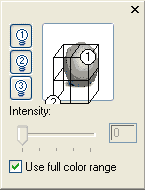
5. Try out different options for lighting and create following effect.

6. From the Fountain Fill flyout menu select the Texture Fill Dialog.

7. Apply the desired texture to the text.