When you're in a rush, this metal will do.
1.
Start off by creating a new document and filling it with a dark
browm (or any other color you would like to use). Now add some noise by going Filter>Noise>Add Noise. I used
Monochrome, Gaussian, with an intensity of around 16%.
2. The next step is to apply the Filter>Render>Lighting Effects Filter. Click the image to the left to see the settings I used.
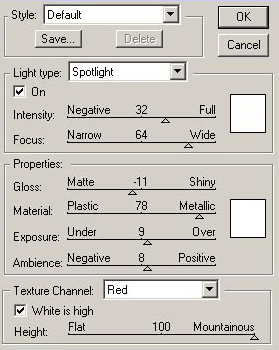 Click to enlarge |
3.
And you've got some quick, rough metal :)
Now wasn't that simple?