

For celebratory occasions
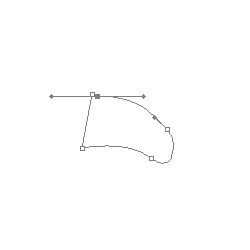
01. Create the path below with the pen tool. You can also use the polygonal lasso, or any other method you choose.
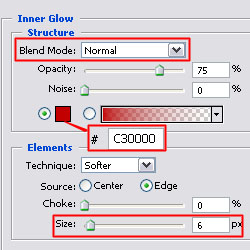
02. Fill the path or shape with the color of your bow, and apply an 'Inner Glow' with Normal Blend Mode, a darker color than your bow (in this case, #C30000), and Size 6.
03. You should achieve the following shape:

04. Duplicate this shape 3 times, and position them as shown.

05. Now use the Shape Tool and create a Path using the rounded rectangle with radius 10px.
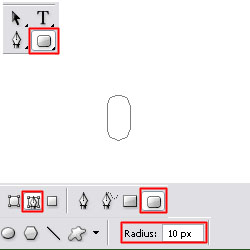
06. Fill the shape, and apply the same layer style as the other shapes (inner glow).

07. Position the rounded rectangle over the center of the four outside pieces.

08. Using the elliptical marquee tool, create a thin oval and color it with a darker color than your bow.

09. Position the thin oval under an outside piece as shown:

10. Do the same for all the outside pieces.

11. Using the polygonal lasso tool, create this trapazoidal shape and apply the same layer style.

12. Place two trapazoids beneath the rest of the bow as shown. You have now completed the bow.

