code is becoming ever so popular, because it can add that extra touch to a beautiful website. All the colours are up to the designer so its very flexible. However this only works in IE browsers with version 5.5+. Older and other browsers just ignore the code. (Note: the code in red is the color value that you change)
| <style> <!-- body { scrollbar-face-color: #9E0B0E; scrollbar-shadow-color: #303030; scrollbar-highlight-color: #A7A7A7; scrollbar-3dlight-color: #9E0B0E; scrollbar-darkshadow-color: #000000; scrollbar-track-color: #640000; scrollbar-arrow-color: #000000; } --> </style> |
2.Where do
you put this code? Simple. You place it in between the head tags like so:
| <html> <head> <title>IE Scrollbar</title> <meta tags.....> <style> Scrollbar Code (Above) Goes Here. </style> </head> <body> Your own content here. </body> </html> |
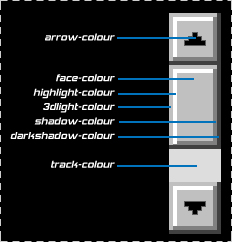
3.This picture
will help you determine which colors to put where.