Her

Home Photoshop Tutorials Web Layout Orb Buttons

Orb Buttons

Author: Netcubo Author's URL: www.netcubo.com More by this author

Introduction
Make a nice life looking small orb, with this easy and simple tutorial.

Step 1
This is a very easy tutorial. First of all make a new document of 500x500 pixels. Make a new layer call it orb. Make a fixed size of Elliptical Marquee Tool 50x50 pixles.

image 1

Step 2
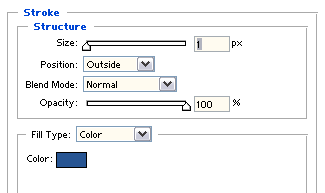
Go straight to {Layer » Layer Style » Blending Option » Stroke} and put in these settings:

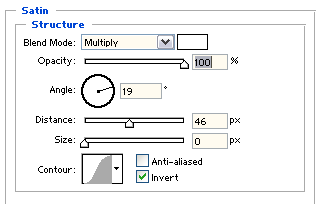
Now go to Satin and enter these settings:

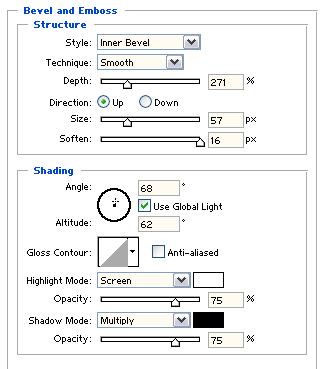
Then go to Bevel and Emboss and enter these settings:

image 2

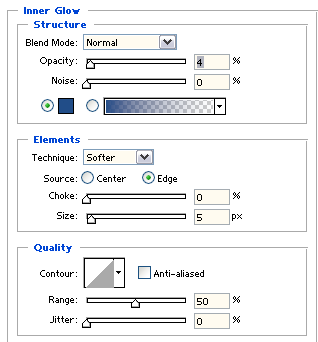
After that go to Inner Glow and enter these settings:

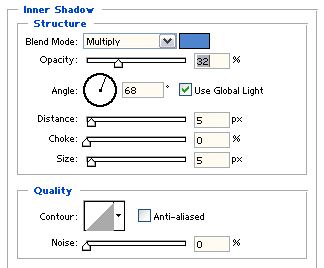
Once you've done that go to Inner Shadow and enter these settings:

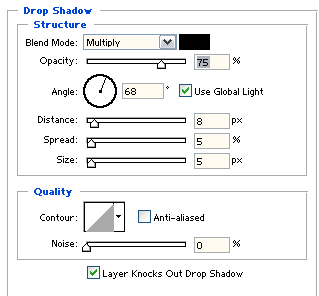
Then the final touch go to Drop Shadow and enter these settings:

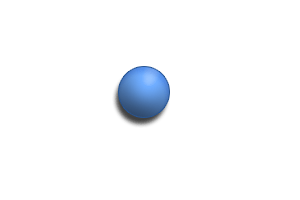
Now you can save your style simply by clicking New Style.. so you don't have to go through those steps over and over again. You now should have something that looks like this:

Orb Buttons