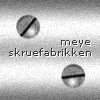
You can't make this tutorials from here. Start with this tutorial - Metal Orb. When you are finish with Metal Orb then go back to this tutorial again.
Create a new layer and pick Rectangular Marquee Tool and select a rectangle in the middle of the orb. As you can see at the picture, the rectangle isn't rounded in the edges. It doesn't matter.
Fill the selection with #3B3B3B
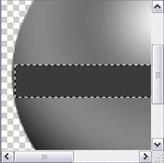
Now we are going to make the "3d" effect. Pick Rectangular Mar. Tool again and make a 2px-height-selection as long as the grey rectangle. We are going to use the selection in the top and in the bottom of it. Fill the selection with black (#000000) and pick Move Tool. Place it in the top. Duplicate the layer og fill the new one with white (#FFFFFF). Pick Move Tool and place the white line in the bottom of the grey rectangle. Like the picture here...
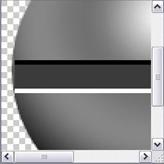
Then make your picture smaller with Image > Image Size.
You are finish.