Open a new 250x150 px document. I've filled the background with a blue colour. It reminds me on Christmas.
Set the foregroundcolour to #C2C2C2 and grab the text-tool. Type a word. I've written "156" with Times New Roman in size 120 pt. Then I've given the text a 2 px. big Stroke, but it isn't important for the result.

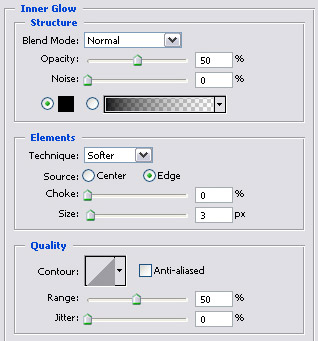
Create a new layer and go to Blending Options (layer > layer style > inner glow) and set these settings for Inner Glow:
Grab Brush Tool and open the brush-list in Options Bar. Scroll a bit down and find "Airbrush Hard Round 9". Then set the foregroundcolour to white by hitting D and then X on your keyboard.
Then start by drawing some snow on the text.
You are already finish.