Start a new document and fill it with a background color of your choice.

Now choose the pencil tool and set brush size to 1px.
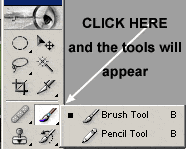
Press D to reset your color (your foreground color needs to be black).
Now just draw a black horizontal line across the canvas.

Now apply this Drop Shadow layer style to the line:
Layer->Layer Style->Drop Shadow:
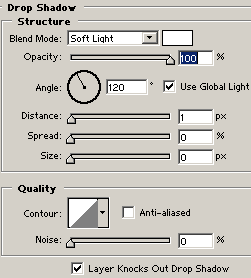
Then set the line's blending mode to "Soft Light"

Now you can use this line to do some interesting things, such as making a menu system for your website. to the left is an example.