

Step 1:
Open an image of girl with Photoshop. Create a new Layer, with the "Brush
Tool" (  ), and choose
this color #efe65, this is not important.
), and choose
this color #efe65, this is not important.
With this tool you should make many lines on the hair, look the " Image 1 ". Alternate the brush size from 2 to 4 pixels.
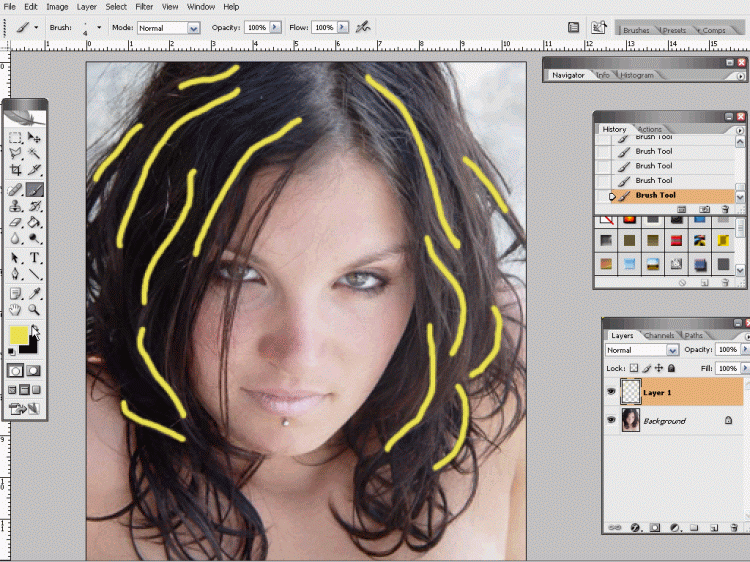
Image 1 (Click to enlarge)
Step 2:
Now with Eraser Tool (  )
make these areas sharper at the ends.
)
make these areas sharper at the ends.
Look "Image 2".
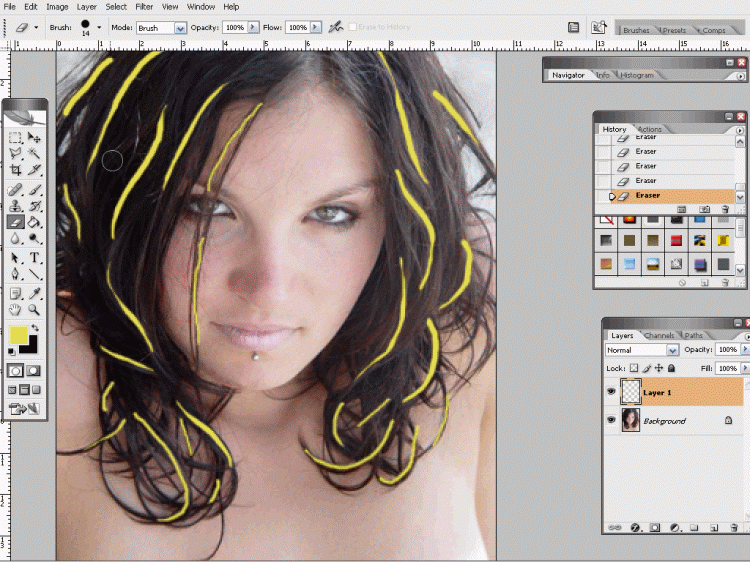
Image 2 (Click to enlarge)
Step 3:
Now set the blending mode to "Overlay" and set the opacity to 35%.
Look more final result with another colors: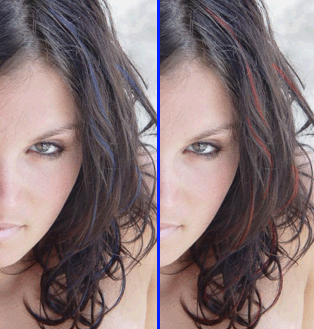 Download the Video-Tutorial
Have you some problem to see video tutorial? Download this CODEC: TSCC_codec.rar
Problem with download video tutorial? Right click, Save Target As...
