


Draw in a Flash movie.
This tutorials illustrates how to use onMouseMove onMouseDown and onMouseUp events to draw lines in a Flash movie.
Download and install Flash Designer 5
- Create a new document and set the size to 400 x 300 ("Frame" > "Frame Size")
- Set "Frame 1" to "Stop" ("Frame" > "Frame Delay" and check "Stop", click OK)
- Draw the pen cursor using the Shape tool. Select both shapes and choose "Edit" > "Convert to Sprite". Quit the sprite with "Esc" key.
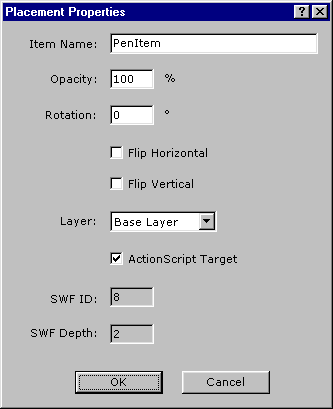
- Select the sprite and choose "Item" > "Placement Properties". Check "ActionScript Target" and
rename the item to "PenItem":
- Choose "Frame" > "ActionScript" and paste the following code:
_root.createEmptyMovieClip("myLine", 0);  // create blank movie to draw on

function moveroutine() // this moves the pen to follow the mouse
{
 PenItem._x = _xmouse;
 PenItem._y = _ymouse - PenItem._height;
}

function drawroutine() // this draws the line when the button is pressed
{
  myLine.lineTo(_xmouse, _ymouse);
  moveroutine();
}

_root.onMouseMove = moveroutine; // initially we only move the pen

_root.onMouseDown = function() // when the user clicks the button
{
   myLine.moveTo(_xmouse, _ymouse);
   myLine.lineStyle(2, 0xff0000, 100);
   _root.onMouseMove = drawroutine;
}

_root.onMouseUp = function() // when the button is released
{
   _root.onMouseMove = moveroutine;
} |
Hit F9 to preview the movie.
Note: You have to target Flash Player 6 or above.
Download source project t1042.zip (4 kb)
