

Learn to water mark images in photoshop in simple steps.
Original image:

Watermarked Image:

Let's start now
Step 1: Open the image you want to watermark in photoshop.
Step 2: Create a new layer

Add the text to it.

Step 3: Select Edit>Free Transform or Press ctrl+t to perform free transform.

Step 4: Let's set the opacity of the text layer to say 10%
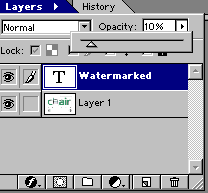
And we are done.
So we have our watermarked image ready for use.
