Step 1: Make a new document with a white background. Click the type tool (or Ctrl+t) and write your desired text in black.
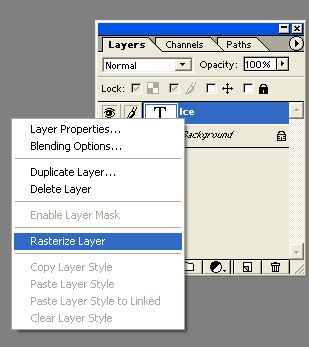
Step 2: Right Click on that layer in the little layer window and select Rasterize Layer.
Step 3: Merge the text image with the background image by hitting "Ctrl+E" Then go to Filter--> Pixelate--> Crystallize. Set the Cell Size as "3".
Step 4: Go to Filter--> Stylize--> Find Edges. Then go to Filter--> Blur--> Gaussian Blur. Enter 1.0
Step 5: Go to Image--> Rotate Canvas--> 90° CW. Then go to Image--> Adjustments--> Invert (Ctrl+I). Then Filter--> Stylize--> Wind. (make the method is "wind" and the direction is "from the left")
Step 6: Image--> Rotate Canvas--> 90°CCW. (this should turn it back round so you'll know if its upside down!)
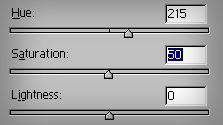
Step 7: Then go to Image--> Adjustments--> Hue/Saturation (Ctrl+U). Check the "Colorize" option, and input these numbers.
Final Product
...and your finished making your text icy! Below is the finished product.