

Here's a tutorial to show you how to lighten a part of your sig.
End result:

Step 1: Begin by opening the sig you want to apply this to. I'm choosing this one.

Step 2: Create a new layer and select your Rectangular Marquee Tool.
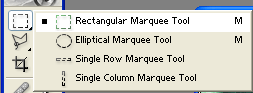
Step 3: Create a rectangular box where ever you want on the sig and fill it with white.

Step 4: Change the blending mode to soft light and your done.
Step 5 (Optional): You can change the opacity of the layer if you wish too.
100% Opacity
50% Opacity

Hope you enjoy this tutorial.
