Basics of Div Tags
Every HTML tag serves a specific purpose. We use the < p > tag to separate paragraphs within a copy. To highlight headings and add hierarchy to content, we use < h1 > to < h6 > tags. The purpose of the < div > tag, however, is to unite big groups of sections within HTML documents. By means of < div > we apply CSS styles in bulk. For example, we can unite two or more paragraphs of text under one < div > applying one CSS style.
What Differs Div from Span
The main difference is that < div > belongs to the type of block-level elements. It means that < div > shows its own block. It’s not possible to put < div > inside a < p > or a < h1 > tag. If you add < div > within these tags they will be broken.
So whenever you need to supply custom styles inside the < p > tag or < h1 > tag, use < span >.
Difference Between Div and Section
In simple words, < section > lets you create independent sections within a web page having logically related content. The general rule is that the < section > should be applied only if the element's contents are to be listed in the document's outline.
The content gathered in < section > relates to the same theme. On a website, you can often come across such examples of < section > as chapters, numbered sections, etc. A website’s homepage features many sections. Some of the most common sections you might find on a website’s homepage are news, contact details, about, our team, etc.
Check out the following example of using < section > tag:

There's no uncommon meaning that the < div > tag bears. It speaks to other components on a web page. In most cases, it incorporates the page title, lang, course, etc. You may also apply the < div > tag to include semantics common to a bunch of sequential components.
Let’s see an example of using < div > on your site:

Syntax
As with most HTML tags, < div > comes in pairs of opening and closing tags. It’s also vital to pay special attention to the way different layout elements have relevant positioning on all screen sizes.
In HTML, the syntax for < div > is:
< body >
< div >
< /div >
< /body >
Div Attributes
Before HTML5 was introduced we had the div attribute "align" to organize content in a div block. Now, however, we use CSS to position elements on the page. The div tag supports these global attributes:

And these event attributes.
How to Style Div
There are many CSS properties we use to add a custom style to the< div tags. These properties can be divided into groups based on the styling effects you get. For example, the most popular ones let you adjust texts within your copy, using< div to set font weight and size.
Let’s pause for a minute and discuss the font-style property in more detail. It lets you add the normal, italic, and oblique values.
Here's an example of the oblique and italic values applied:

In this example, “normal” sets the default value of the property, meaning that the text will be normal. Italic highlights the chosen piece of text in italics, oblique highlights the chosen text in oblique. Initial sets the default property value.
CSS font properties also let you apply the following modifications to your copy:
- specify the element’s font family;
- define if the element feature large, medium, 100% or 15px font size;
- highlight the text in bold or thick;
- set the capitalization rules for the text in a chosen element, making it appear in uppercase or lowercase;
- add overline, line-through, underline, underline overline text embellishments to h1, h2, and h3 tags.
There are other styling options available. They include adding custom color to selected elements, managing the background colors within the < div > tag, adding shadows to texts, defining the height of lines, the spaces between characters in a line, managing spacing between words, etc.
Applying Styles
Div is commonly used to add styles to different text and web layout elements. There are 2 ways to add styles to a specific element or any other element that it contains:
- Manage the element’s style with < div >
Source
- Another way to style elements is by using embedded styles of an external style sheet
Source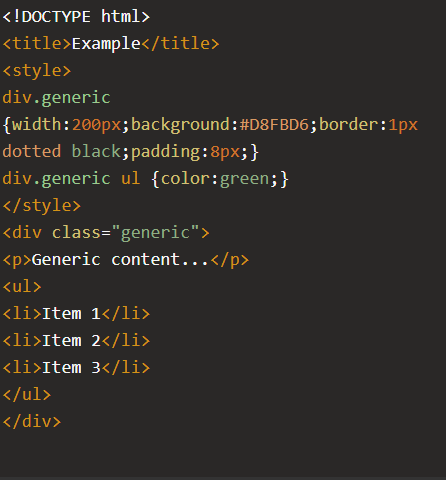


Finishing up With an Example
With all that said about the basic use of the < div > tag, let’s consider the following example to see how everything works in practice. Though the example is not new, it is simple enough to play with and perfectly demonstrates most of what we discussed above.
Create a new HTML file in Macromedia Dreamweaver 8 (Ctrl+N).

Then create a new CSS file by following the same steps as above, just make sure you select "CSS" instead of "HTML". Then save the two newly created files in the same folder. For example "my website". Save the HTML file as index.html and the CSS file as css.css.
The first thing we want to do, is to set the padding and the margins on the index site to 0. This is done using the CSS file we just created. Open your CSS file.

On line 3, type the same as I've done.

Now, go back to your html page and import your stylesheet.
Then switch to code view.

Inside the body tags, write this:
| <div id="main-wrap">
</div> |
This will be the main container of the page.
Then, inside the newly created div tag, create another one. Like this:
| <div id="main-wrap">
<div id="header"></div> </div> |

Then, underneath the header div, still inside the main-wrap, write three more divs.
| <div id="content"><div>
<div id="navigation"></div> <div id="footer"></div> |
You should also fill the div tags with some placeholder text like this:

If you return to the design view, you will see four of your div tags. This is because you filled them with text. Empty div tags will be 0px in height if you don't set the height using CSS.
It doesn't really look like a web site yet. But after some work in the CSS sheet we will get closer to a full site.
Open your CSS sheet.
On a new line, type:
| #main-wrap{
width: 800px; margin: auto; } |
This will set the width of the main-wrap div to 800px. The margin property is set to auto. This will center the div tag.

If you go back to the html page, you can see the changes we made.
It should look like this:

Go back to your CSS sheet and write this:
| #main-wrap{
width: 796px; margin: auto; background-color: #CCCCCC; padding: 2px; } #header{ height: 100px; margin-bottom: 2px; } #content{ float: right; width: 640px; padding: 5px; background-color: #FFFFFF; } #navigation{ margin-right: 652px; padding: 5px; background-color: #FFFFFF; } #footer{ clear: both; margin-top: 2px; padding: 5px; background-color: #FFFFFF; } |

That's how you set up your divs for a site.
Copyright © . All Rights Reserved